When you buy a car, inherit one, or need to verify road tax status, knowing how to check a vehicle is taxed is essential. Road tax is a legal requirement for almost every car on UK roads. Driving an untaxed vehicle carries significant penalties, including fines up to £1,000 and vehicle impoundment. This guide walks you through exactly how to check vehicle tax status using the official government tool, what information you'll need, and what to do if you find an issue.
How to Check a Vehicle is Taxed
The quickest way to check if a vehicle is taxed is using the free government vehicle tax checker on gov.uk. You need only the vehicle registration number (the alphanumeric code on the number plate). The checker returns instant results showing whether the vehicle has current, valid tax or if tax has lapsed.
Visit the vehicle tax checker tool on gov.uk, enter the registration number exactly as it appears on the plate (for example, AB21 XYZ), and the system displays the tax status within seconds. If tax is current, you'll see the expiry date. If tax has lapsed, the checker flags this clearly. No login, personal details, or fees are required.
Pro TipWrite down the registration number exactly as shown. Spacing and formatting matter; AB21XYZ and AB21 XYZ may return different results. If checking from a photo, double-check each character is correct.
What Information You'll Need
To check a vehicle is taxed using the gov.uk checker, you need only the vehicle registration number, the alphanumeric code on the front and rear number plates. You do not need the V5C registration certificate, keeper's name, vehicle VIN, or any other documentation.
If you're the registered keeper and want detailed tax information, log into your DVLA account using your V5C reference number and password.
Information Type
Required for Basic Check
Required for DVLA Account
Vehicle registration number
Yes
Yes
V5C reference number
No
Yes
Keeper's name
No
Yes
Vehicle VIN
No
No
Step-by-Step Lookup Process
Using the vehicle tax checker takes fewer than two minutes:
Step 1: Open the gov.uk Vehicle Tax Checker
Navigate to gov.uk and search for "check vehicle tax". The official checker appears at the top of results. Confirm the URL contains "check-vehicle-tax".
Step 2: Enter the Registration Number
Type the vehicle's registration number into the search field, including the space if present (AB21 XYZ format). Do not include punctuation.
Step 3: View the Results
The system returns one of three outcomes: (1) Vehicle tax is current until a specific date; (2) Vehicle tax has expired; or (3) Vehicle not found. The third result typically means an incorrect registration number was entered.
Step 4: Note the Expiry Date
If tax is current, the checker displays the exact expiry date. Tax expires at midnight on the last day shown, so plan your renewal accordingly.
Watch OutIf the checker shows tax has expired, do not drive the vehicle on public roads. An untaxed vehicle is illegal to drive, risking a £1,000 fine, six penalty points, and vehicle impoundment. If you've just bought the vehicle and tax has lapsed, you must tax it immediately.
Understanding Vehicle Tax Status
Vehicle tax status is binary: a vehicle either has current, valid road tax or it doesn't. Road tax is distinct from insurance, MOT, and maintenance. You can have a fully insured, recently MOT'd vehicle that is untaxed if the road tax has expired. From a legal standpoint, that vehicle cannot be driven on public roads.
The DVLA and police use real-time data to identify untaxed vehicles; many are automatically flagged by Automatic Number Plate Recognition (ANPR) cameras. Once you tax a vehicle, the status updates within minutes on the checker.
Road Tax vs Other Vehicle Costs
Road tax, MOT, insurance, and servicing are four separate legal requirements with different purposes and renewal cycles.
Road tax (vehicle tax) is a government fee paid to HMRC funding road maintenance and environmental initiatives. It must be renewed annually or every six months for some vehicle types. The amount depends on the vehicle's CO2 emissions and registration date.
MOT (Ministry of Transport test) is an annual safety and emissions test required for vehicles over three years old. An MOT certificate proves the vehicle meets minimum safety standards but does not exempt you from road tax.
Insurance is a legal requirement providing third-party liability cover. An insured vehicle with no road tax or MOT is still illegal on public roads.
Servicing is maintenance to keep the vehicle running safely and efficiently. Unlike tax, MOT, and insurance, servicing is not legally required, though it's strongly recommended to maintain warranty coverage and reliability.
Key TakeawayRoad tax, MOT, and insurance are three separate legal requirements. You must have all three current to legally drive a vehicle on UK roads.
Using the Vehicle Tax Checker on gov.uk
The gov.uk vehicle tax checker is the official, free tool maintained by DVLA, drawing real-time data from the tax system. Results are always current and accurate.
Access the checker by visiting gov.uk and searching "check vehicle tax". No account, login, or personal information is required. Simply enter the registration number and the checker returns the tax status within seconds. This tool is particularly useful when buying a used car privately. Before handing over money, verify that the vehicle's tax is current.
Accessing the Free Checker Tool
Open a web browser and go to gov.uk. Use the search bar and type "check vehicle tax". The official checker appears prominently at the top of search results. The checker page is straightforward: a single text field, a blue "Check tax status" button, and instructions. There are no ads, pop-ups, or payment requests. If you see a website asking for money to check vehicle tax, it's not the official tool.
The tool works on desktop computers, tablets, and smartphones, so you can check a vehicle's tax status anywhere.
Troubleshooting Lookup Errors
If the checker returns "Vehicle not found", several common issues may be responsible.
Incorrect registration number is the most frequent cause. Double-check every character: the two letters, two numbers, and three letters. A single character wrong will cause the lookup to fail.
Spaces in the registration number can affect results. Modern plates use a space in the middle (AB21 XYZ), while some older plates don't. Try the lookup both with and without the space if your first attempt fails.
Very new vehicles registered within the last few days may not yet appear in the DVLA system. Wait 24-48 hours and try again.
If you've verified the registration number multiple times and the checker still shows an error, contact the DVLA directly by phone or visit a local DVLA office.
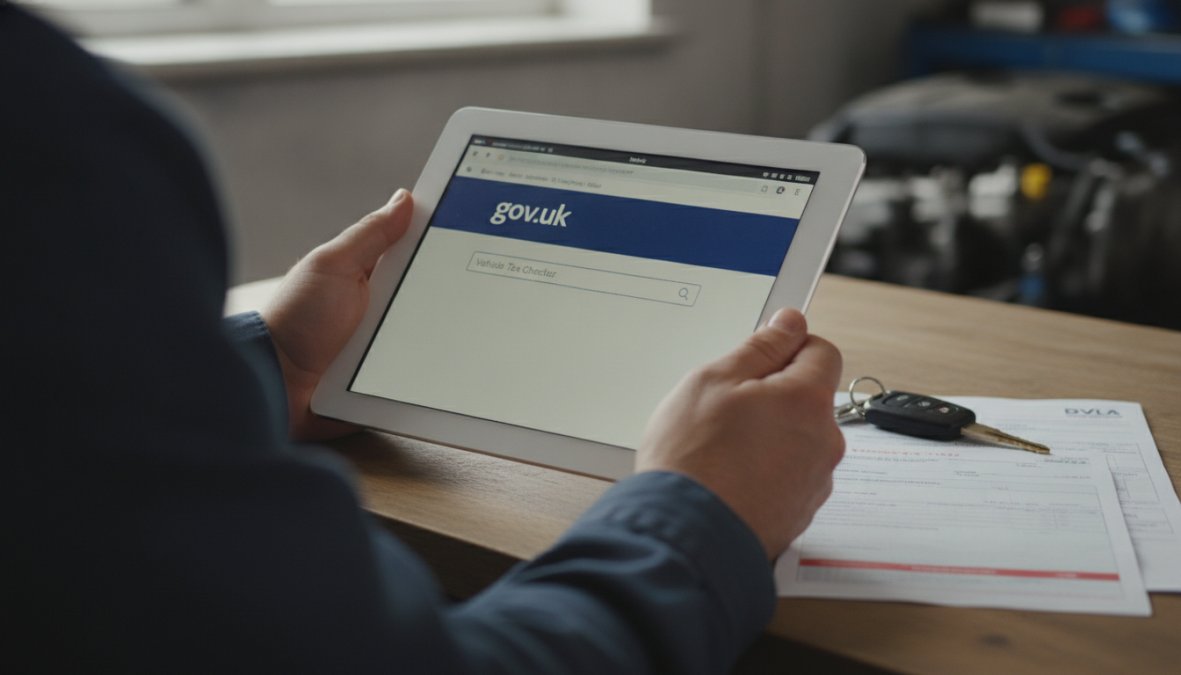
Close-up of hands using a laptop to access the gov.uk vehicle tax checker website, with a vehicle registration document visible on the desk beside the computer
How to Tax a Car: Registration and Renewal
Once you own a vehicle or become the registered keeper, you're responsible for ensuring road tax remains current.
Tax Renewal Before Expiry
Renewing your vehicle tax before expiry is the simplest way to ensure your vehicle remains legally taxed. Log into your DVLA account using your V5C reference number and password. The system displays your vehicle details and current tax expiry date. You can renew up to four weeks before expiry. Select your renewal period (one month or twelve months) and choose your payment method. The system accepts debit cards, credit cards, and PayPal. Once payment is confirmed, your tax status updates within minutes.
Alternatively, renew by phone by calling the DVLA, in person at a Post Office, or by post (allow at least a week for processing).
Pro TipRenew your tax online up to four weeks early. This gives you a buffer; if payment fails or there's a system issue, you still have time to sort it before expiry.
Tax Liability for New Owners
When you buy a used car privately, you become the registered keeper, and road tax liability transfers to you immediately. The previous keeper's tax is not automatically transferred to you. If you buy a vehicle with two months of tax remaining, that tax expires on the original date, and you must then pay for your own tax from that point forward.
If you tax the vehicle before the previous keeper's tax expires, your tax period begins on the expiry date of their tax, not immediately. This prevents overlapping tax periods and ensures continuous coverage without gaps.
SORN a Vehicle: Off-Road Notification
SORN stands for Statutory Off Road Notification. It's a formal declaration to the DVLA that a vehicle is not being driven on public roads and therefore does not require road tax during that period. Without SORN, an untaxed vehicle is illegal to drive on public roads. With SORN, the vehicle is legally off the road and does not need to be taxed.
When to Declare SORN
Declare SORN whenever you're keeping a vehicle off public roads for any length of time. Common scenarios include seasonal storage, long-term repairs, or temporary non-use. To declare SORN, log into your DVLA account online, or contact the DVLA by phone or post. Provide the vehicle registration number and the date you want the SORN to begin.
How SORN Affects Tax Status
Once SORN is declared, the vehicle's tax status on the checker shows as "SORN declared". The vehicle is no longer considered taxed, but it's in a separate category: off the road. Driving a SORN vehicle on public roads makes it untaxed and illegal. When you're ready to use the vehicle again, remove the SORN and tax it.
Car Tax Exemptions and Special Cases
Certain vehicles are exempt from road tax entirely.
Vehicles That Qualify for Exemption
Historic vehicles (typically 40 years old or older) qualify for exemption if they're of historical interest and not substantially altered from their original specification.
Disabled people's vehicles receiving Disabled Tax Relief are exempt from road tax. If you receive the higher rate of Disability Living Allowance (DLA) for mobility or Personal Independence Payment (PIP) for mobility, you may qualify.
Electric vehicles registered for the first time after April 1st, 2010 are exempt from road tax for the first year. After that, they pay the standard rate.
Vehicles with zero CO2 emissions (pure electric vehicles) pay no road tax after the first year exemption.
To claim exemption, apply to the DVLA with proof of eligibility.
Historic and Electric Vehicle Relief
Historic vehicle exemption applies to vehicles manufactured at least 40 years ago, provided they're maintained in their original condition. Once approved, the vehicle checker shows "Exempt" and you never pay road tax again, provided you maintain the vehicle's historic status.
Electric vehicle relief exempts new electric vehicles from road tax for twelve months from first registration. After that, many electric vehicles fall into the lowest band and pay minimal tax or nothing for zero-emission vehicles.
Common Mistakes When Checking Vehicle Tax
Confusing the registration number with the VIN is surprisingly common. The checker requires only the registration number (the alphanumeric code on your plates), not the Vehicle Identification Number (VIN).
Assuming tax is current without checking is dangerous when buying a used car. Always check yourself before handing over money.
Forgetting to renew before expiry happens to thousands of motorists annually. Set a calendar alert three weeks before expiry to prevent accidental lapsing.
Not understanding SORN leads to confusion about off-road vehicles. SORN simply means the vehicle is off public roads entirely. Driving a SORN vehicle on any public road is illegal.
Checking the wrong registration number happens when people misread plates or confuse similar-looking characters. Always double-check the registration number character by character before submitting it.
Keeping Your Vehicle Tax Current
Staying on top of vehicle tax renewal ensures your vehicle remains legal to drive and prevents fines, points, and impoundment.
Setting Reminders and Renewal Dates
Set a calendar reminder for three weeks before your tax expiry date, early enough to renew without rushing, but close enough that you won't forget. Most smartphones and calendar applications allow recurring reminders. Set an annual reminder for the same date each year if you renew annually.
The DVLA sends reminder letters approximately four weeks before tax expires, but postal reminders can be delayed or lost. Set your own reminder as a backup.
What Happens if Tax Lapses
If you miss the renewal deadline and your vehicle's tax expires, the vehicle immediately becomes untaxed and illegal to drive. Driving an untaxed vehicle carries severe penalties: fines up to £1,000, six penalty points on your driving licence, vehicle impoundment, and insurance invalidation.
The moment you realize tax has lapsed, do not drive the vehicle. Tax it immediately online, by phone, or at a Post Office. Once you've paid, the status updates within minutes and the vehicle is legal again.
Keeping your vehicle taxed is straightforward with the gov.uk checker and a simple reminder system. Ensuring your vehicle is road-legal involves more than tax, it requires current MOT, valid insurance, and proper maintenance. At Kettering Motorist Centre, we handle the servicing and MOT testing that keeps your vehicle safe and compliant. Book your MOT with us today and let our expert team ensure your vehicle meets all safety and legal requirements.
Frequently Asked Questions
How can I check a vehicle is taxed for free?
You can check a vehicle is taxed using the free gov.uk vehicle tax checker tool. You'll need the vehicle registration number and V5C reference number from the vehicle log book. Visit the gov.uk website, enter these details, and the system will instantly display the current tax status, expiry date, and any outstanding penalties. This is the official, free method used by most UK motorists and buyers.
What information do I need to check vehicle tax status?
To check a vehicle is taxed, you need two key pieces of information: the vehicle registration number (number plate) and the V5C reference number found on the vehicle log book. Some older vehicles may require the registration number alone. Having both details ensures accurate results when using the gov.uk tax checker tool. If you're buying a used car, ask the seller for these details before completing the purchase.
What should I do if I can't find the vehicle on the tax checker?
If you cannot check a vehicle is taxed using the standard lookup, several issues could be responsible. Verify the registration number and V5C reference are entered correctly, common mistakes include confusing the letter 'O' with zero. If the vehicle was recently registered, records may take 5-7 working days to update on the system. For vehicles with SORN (Statutory Off Road Notification) declared, they will show as untaxed. Contact DVLA directly if you believe there's an error with the vehicle's records.
Can I check vehicle tax status when buying a used car?
Yes, checking a vehicle is taxed is essential before purchasing a used car. Request the registration number and V5C reference from the seller, then use the gov.uk tax checker to confirm the tax status and expiry date. This protects you from inheriting tax penalties or an immediately expired tax liability. You'll also want to check the MOT status and vehicle history. At Kettering Motorist Centre, our expert team can advise on the full condition and compliance of any vehicle you're considering.
Your booking Failed
Please try again or please call 01536 410142
Thank you for placing a booking with Kettering Motorist Centre Limited for vehicle
PLEASE TAKE YOUR BOOKING REFERENCE NUMBER WITH YOU TO THE MOT CENTRE
Your items
MOT Test
×
Terms and Conditions
These terms and conditions form the basis on which you can visit and use this website. Please read them carefully as they contain important information.
General terms and conditions
This website is owned and operated by Kettering Motorist Centre Ltd (company registration number: 4485858) operating at Trafalgar Road, Kettering, Northamptonshire, NN16 8DB (the "MOT Centre", the "Company", "we" or "us"). If you have any queries about these terms and conditions or if you have any comments or complaints on or about this website, you can contact us at [email protected] or 01536 410142.
The website is to promote and offer for sale the products and services of Kettering Motorist Centre Limited.
1. The contract between us
This website does not take payment for products or services online. The website enables you to view products and services online and to make a booking for later delivery and payment. The vehicle and provision of other products and services promoted by this website and the payment by you of the price of those products and services will take place at the MOT Centre. The booking does not constitute a contract.
The booking process on the site provides details of the booked MOT order. Please take the time to read and check your booking. It is your responsibility to make sure the order is correct and for the correct vehicle.
2. Ownership of rights
All rights, including copyright, in this website are owned by or licensed to the Company. Any use of this website or its contents, including copying or storing it or them in whole or part, other than for your own personal, non commercial use, is prohibited without our permission. You may not modify, distribute or repost anything on this website for any purpose.
3. Accuracy of content
We have taken care in the preparation of the content of this website, in particular to ensure that prices quoted are correct at the time of publishing and that all goods have been fairly described. However, bookings will only be accepted if there are no material errors in the description of the goods or their prices as advertised on this website. Any weights, dimensions and capacities given about the goods are approximate only.
4. Damage to your computer
We try to ensure that this website is free from viruses or defects. However, we cannot guarantee that your use of this website or any websites accessible through it will not cause damage to your computer. It is your responsibility to ensure that the right equipment is available to use the website. Except in the case of negligence on our part, we will not be liable to any person for any loss or damage which may arise to computer equipment as a result of using this website.
5. Availability
All bookings are subject to acceptance and availability. If the MOT date you have requested are is not available, the Centre will contact you by e-mail or phone. You will have the option either to wait until another slot is available or to cancel your booking.
6. Booking errors
You are able to correct errors on your booking up to the point on which you click on “Place Booking” during the booking process.
7. Price
The prices payable for goods that you order are as set out in our website. All prices are inclusive of VAT at the current rates and are correct at the time of entering information, errors and omissions excepted.
Whenever it is not possible to accept your booking to buy goods of the specification and description at the price indicated, the MOT Centre will advise you by email or phone or when you visit the centre.
8. Payment terms
You will be required to pay for the goods or services to the Centre at time of a completed MOT.
9. Delivery charges
N/A
10. Cancellation
The MOT Centre reserves the right to cancel the booking if:
10.1 There is insufficient stock to deliver the goods you have booked.
10.2 One or more of the goods you booked was listed at an incorrect price.
If your booking is cancelled the Centre will notify you by e-mail or phone.
You have the right to cancel your booking at any time up to the point of the MOT. If you do cancel your booking you should inform the centre by phone.
11. Liability
Notwithstanding the foregoing, nothing in these terms and conditions is intended to limit any rights you might have as a consumer under applicable local law or other statutory rights that may not be excluded nor in any way to exclude or limit our liability to you for any death or personal injury resulting from our negligence.
12. Notices
Unless otherwise expressly stated in these terms and conditions, all notices from you to us must be in writing and sent to our contact address given above and all notices from us to you will be displayed on our website from time to time.
13. Changes to legal notices
We reserve the right to change these terms and conditions from time to time and you should look through them as often as possible.
14. Law, jurisdiction and language
This website, any content contained therein and any contract brought into being as a result of usage of this website are governed by and construed in accordance with English law. Parties to any such contract agree to submit to the exclusive jurisdiction of the courts of England and Wales.
15. Invalidity
If any part of these terms and conditions is unenforceable (including any provision in which we exclude our liability to you) the enforceability of any other part of these conditions will not be affected.
16. Privacy
You acknowledge and agree to be bound by the terms of our privacy policy
17. Third party rights
Nothing in this Agreement is intended to, nor shall it confer any rights on a third party.